What is AndroidManifest.xml?
So, the AndroidManifest.xml file is a file configuration which is crusial in an application, why? cz it provides the comprehensive overview of the app’s structure, permissions and security features even before its source code has been analysed in depth.
How to Get the File?
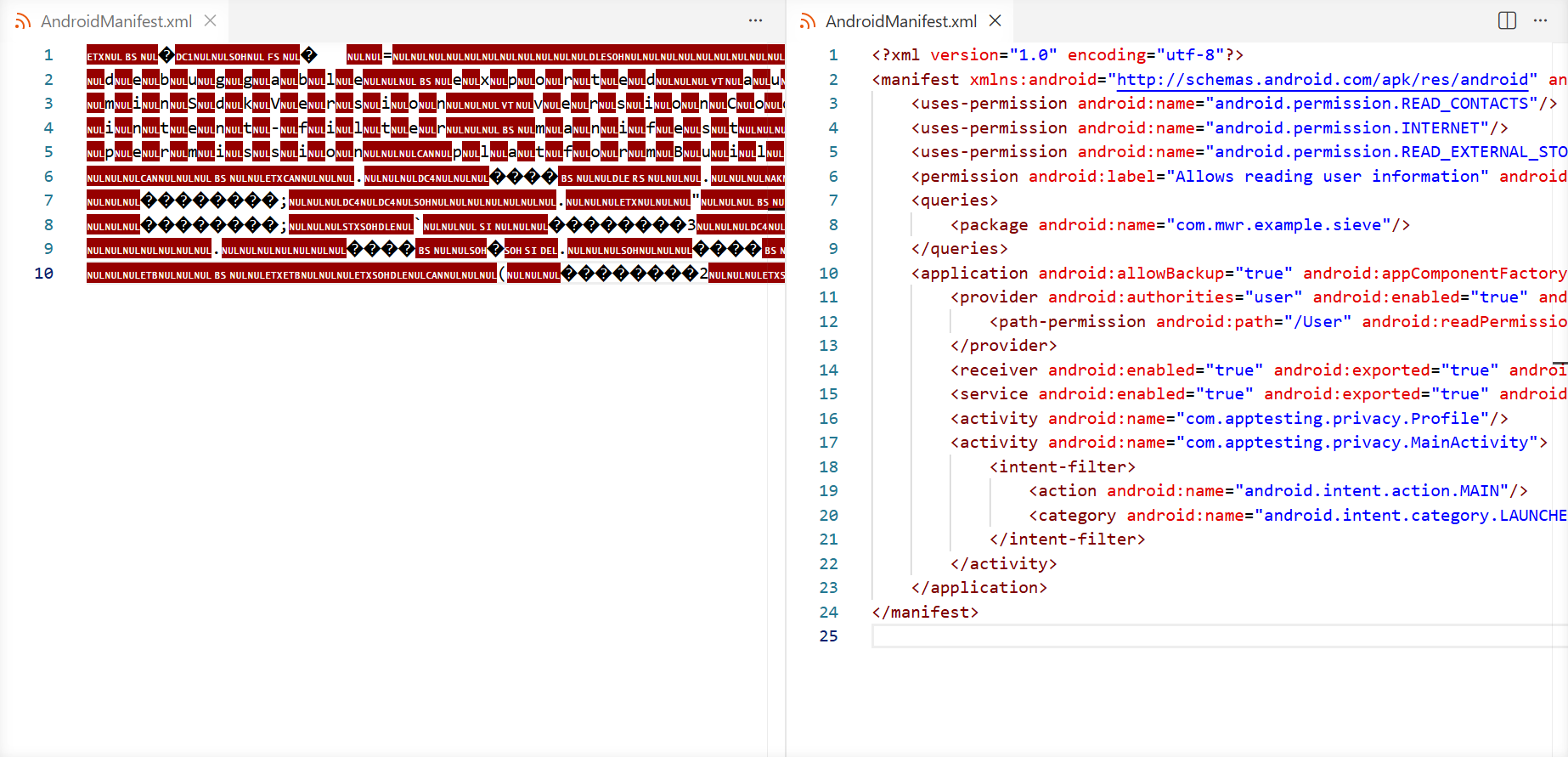
If you want to get the file, you can simply unzip it; but to read the file from an application, we can’t just unzip it because the format is still proprietary binary. We must use a tool like APK Tool with command apktool d [filename].apk to decode the file into XML format which can be read by humans.
Notes:
apktoolcommand is just an alias ofjava -jar apktool_x.x.x.jar
Here is a comparison between unzipping and using APK Tool.
Important Informations Inside AndroidManifest.xml
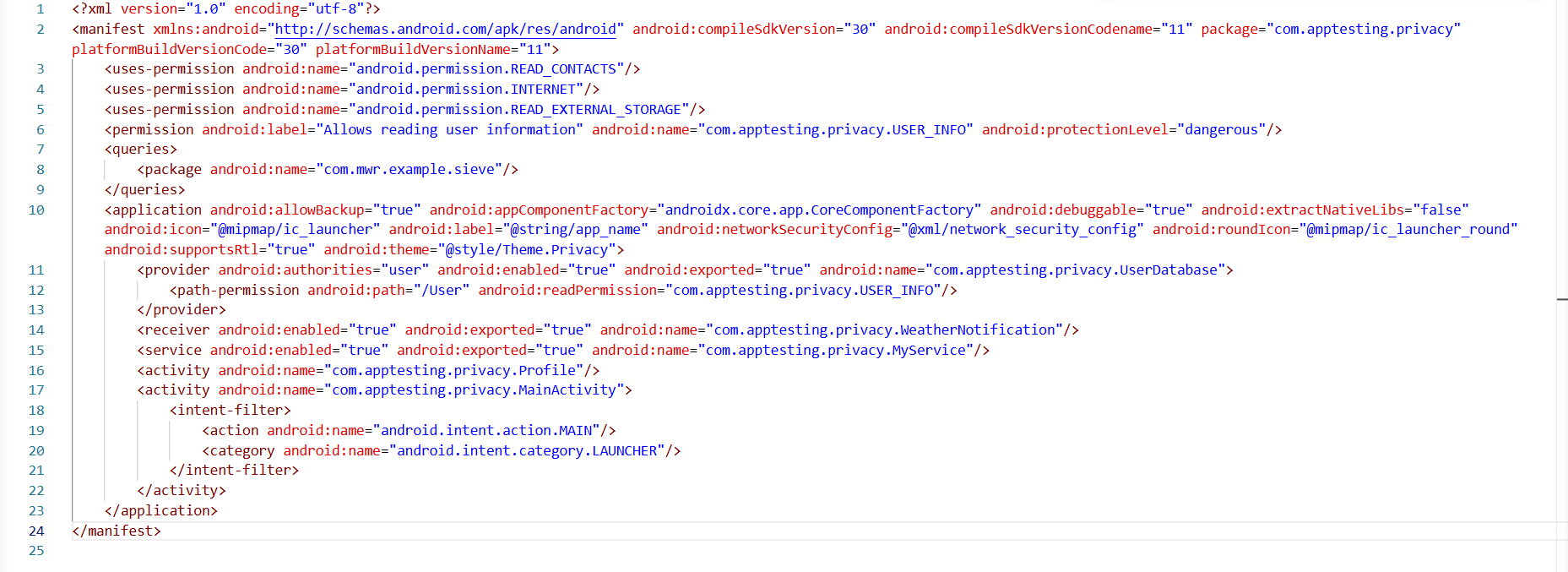
This is the file must be looks like
SDK Version & Security Features
Let’s start with line two because the line one isnt that important.
1...
2<manifest xmlns:android="http://schemas.android.com/apk/res/android" android:compileSdkVersion="30" android:compileSdkVersionCodename="11" package="com.apptesting.privacy" platformBuildVersionCode="30" platformBuildVersionName="11">
3...We’ve got Android compile SDK version 30 and we’ve got Android compile SDK version code name if we take a look at the code below.
1...
2<manifest ... android:compileSdkVersion="30" android:compileSdkVersionCodename="11" ... >
3...Why is this important? cz it means every security feature till Android 11 is included in the application. For example, in Android 7 (API 24), there was a huge change regarding the trust relationship of certificates, so user-installed certificates are no longer trusted by default.
https://android-developers.googleblog.com/2016/07/changes-to-trusted-certificate.html
Package Name
Still on line two, this is the package name, take a look at the code below.
1...
2<manifest ... package="com.apptesting.privacy" ... >
3...com.instagram.android (Instagram’s package name). If you dont have the real one installed, the fake application will install and look totally normal.If you try to install the real one later, you will get an error because your phone maybe like " I already have one application with this ID and the signing certificates dont match, hmm.. Sorry sir".
So you cant have two applications with the same name running on your device.
Permissions
Take a look at these three lines below.
2...
3    <uses-permission android:name="android.permission.READ_CONTACTS"/>
4    <uses-permission android:name="android.permission.INTERNET"/>
5    <uses-permission android:name="android.permission.READ_EXTERNAL_STORAGE"/>
6...So those are the permissions this application can use (for this example). It doesnt mean that they are being used, but the application has the ability to use them if the user grants those permissions.
So every time the application wants to perform certain tasks like using your microphone, camera, or accessing your photos and stuff like that, those permissions need to be included in the
AndroidManifest.xmlright in the code.
Custom Permissions
Take a look at the code below.
5...
6    <permission android:label="Allows reading user information" android:name="com.apptesting.privacy.USER_INFO" android:protectionLevel="dangerous"/>
7...Still on the same line, look below.
5...
6    <permission ... android:name="com.apptesting.privacy.USER_INFO" ... />
7...Queries
This is an Android security feature that manages how applications share data, take a look at the code below.
 6...
 7    <queries>
 8        <package android:name="com.example.abcd/>
 9    </queries>
10...So, if the application wants to get data from the other application, for example ‘abcd’ app, the application needs to introduce itself so the other application knows it exists on the phone. Once visible, the other application can recognize the request and send the data back.
Application Tags
Inside the <application> tag, we can see some interesting stuff, take a look at the code below.
 9...
10   <application android:allowBackup="true" ... >
11...
android:allowBackup="true" means we can perform a backup, for example, by the ADB shell and the data of the application will be included. It doesn’t mean that they are sensitive information included in the backup like credentials or tokens or things like that. It just means that some data will be backup.Next, look below.
 9...
10   <application ... android:debuggable="true" ... >
11...android:debuggable="true", means that having this feature enabled, we are allowed to attach to this process of this application. So we are allowed to debug it.It’s not really often included, but even if it’s not being included in the
AndroidManifest.xml, this file can be used to enable it. So theAndroidManifest.xmlcan be also used to enable certain features, for example debug features.
Next, this is really important, look below.
 9...
10   <application ... android:networkSecurityConfig="@xml/network_security_config" ... >
11...android:networkSecurityConfig="@xml/network_security_config", which points to an network_security_config.xml file that controls the app’s network trust policy.What is this one doing? It’s regarding to certificate pinning, so this file is pretty important when you are dealing with certificate pinning.
Next, we have the four key components of an Android application which are activity, service, receiver, and provider.
10...
11        <provider android:authorities="user" android:enabled="true" android:exported="true" android:name="com.apptesting.privacy.UserDatabase">
12            <path-permission android:path="/User" android:readPermission="com.apptesting.privacy.USER_INFO"/>
13        </provider>
14        <receiver android:enabled="true" android:exported="true" android:name="com.apptesting.privacy.WeatherNotification"/>
15        <service android:enabled="true" android:exported="true" android:name="com.apptesting.privacy.MyService"/>
16        <activity android:name="com.apptesting.privacy.Profile"/>
17        <activity android:name="com.apptesting.privacy.MainActivity">
18            <intent-filter>
19                <action android:name="android.intent.action.MAIN"/>
20                <category android:name="android.intent.category.LAUNCHER"/>
21            </intent-filter>
22        </activity>
23...15...
16 <activity android:name="com.apptesting.privacy.Profile"/>
17 <activity android:name="com.apptesting.privacy.MainActivity">
18 <intent-filter>
19 <action android:name="android.intent.action.MAIN"/>
20 <category android:name="android.intent.category.LAUNCHER"/>
21 </intent-filter>
22 </activity>
23...activity is basically the part of an Android application that you see and interact with. Each screen in an application is usually handled by an activity, like a home page or a profile page. It takes care of displaying the interface and responding to your actions such as tapping buttons or entering text.Next, service, take a look at the code below.
14...
15        <service android:enabled="true" android:exported="true" android:name="com.apptesting.privacy.MyService"/>
16...
service is a component that runs in the background without a user interface. Basically this is a background task. So this help the application keep responsive by offloading work from the main thread.Next, reciever, look at the code below.
13...
14        <receiver android:enabled="true" android:exported="true" android:name="com.apptesting.privacy.WeatherNotification"/>
15...
reciever is simply just an information for applications.
For example, let’s say we are receiving an SMS, then we’ve got the notification, the audio notification, and also the pop up on the screen that we have received new SMS, and also applications will be informed about that SMS has been received.
So this is simply just messaging system.Next, provider, take a look at the code below.
10...
11        <provider android:authorities="user" android:enabled="true" android:exported="true" android:name="com.apptesting.privacy.UserDatabase">
12            <path-permission android:path="/User" android:readPermission="com.apptesting.privacy.USER_INFO"/>
13        </provider>
14...
provider is simply just the form of interacting or providing content. Most of the time this is regarding to database accesses. So the application might use a database where it store some information.If a
pathPermission is enabled, external applications might be able to read the database if they have the right permission.Summary
I wanna take a nap rn… goodbye, i’ll correct it later if there’s any incorrect information T_T